Securely document & manage DPAs & service providers









From uncertainty to clarity: Data protection transparency with the Asset Hub


What are typical assets?
Which tools process personal data? Who uses them and for what purpose? The Asset Hub brings order to your IT system landscape.

Benefits of Software Inventory
Your complete software landscape, GDPR-ready. Record tools, data types, and usage context consolidated in one system, linked with processes and risks. This way, your inventory list becomes the foundation for robust data privacy oversight.
Document processors in a GDPR-compliant manner, including purpose, risk assessment, and contractual situation.

Benefits of Recording Third Parties
Who is involved in your data processes? Make it centrally visible: from freelancers to partner companies. By documenting roles, purposes, contracts, and all other important details, you ensure transparency and compliance with data protection requirements.
Local servers, cloud systems, external media: Where is personal data stored? And is it secure there? The Asset Hub provides the answers.

Benefits of Recording Data Stores
Gain clarity on where your data is located without having to search for it. Assign operators, purposes, and data types to storage locations and ensure compliance when handling sensitive data. Cloud or server room: You immediately see what's inside and know what needs to be done.
Key Features


Together, we will find the right solution for your business
Our data protection software, Proliance 360, saves you measurable time and effort, making data protection management legally compliant and risk-free. Developed by data protection officers for internal data privacy managers. The following packages are available to you.
Still have questions? We have the answers
With the new Asset Hub module in Proliance 360, we address key challenges that our customers face in managing their service providers, software, and data storage. Here are the core problems that Asset Hub solves:
1. Lack of Transparency
Many companies lack a complete overview of the software they use, their service providers, or data storage. This lack of transparency can lead to risks, particularly in data protection and compliance. With the new Asset Hub module, Proliance offers a central digital solution that provides a comprehensive and up-to-date list of all assets. This ensures companies always have an overview of all relevant information and can easily access it.
2. Redundant Asset Capture
The new module eliminates these redundancies and enables a standardized, central capture of assets, making the process significantly more efficient. Once assets are captured, they can be reused across different areas of the platform without requiring re-entry.
3. Lack of Overview of Asset Usage in Processes
The new module brings transparency to these areas by providing a clear link between assets and the processes in which they are used. This allows companies to easily track which assets are used in critical processes and take appropriate risk mitigation measures.
4. Inability to Delete Items
With the new Asset Management module, companies can now efficiently archive or delete assets that are no longer needed, contributing to better data maintenance and clarity.
5. Lack of Audit Documentation
The new module closes this gap by enabling comprehensive audit documentation. This makes it easier for companies to document reviews and controls in an audit-proof manner and access them at any time if required.
6. Capture of Planned Software and Service Providers During Evaluation Phase
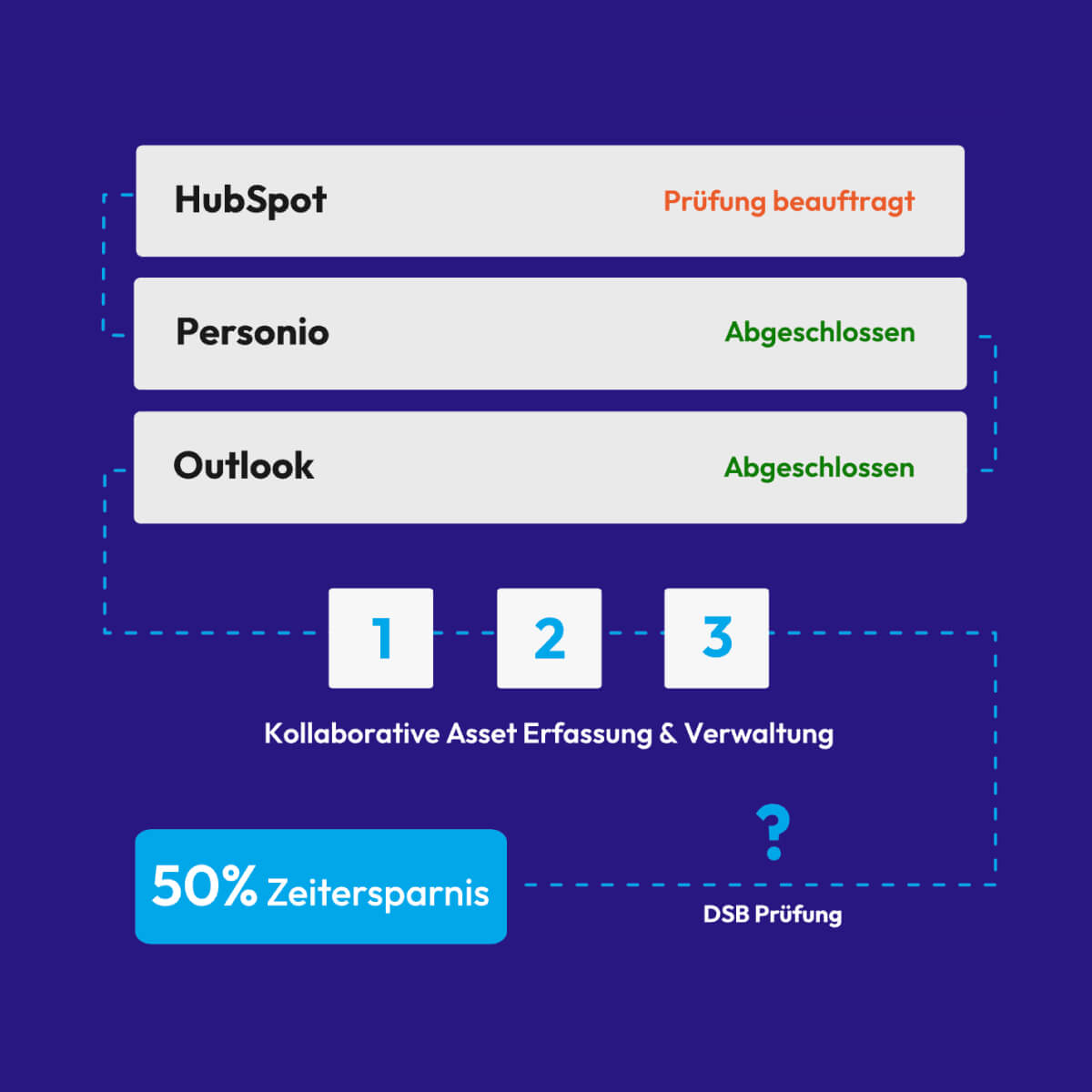
With the new module, planned software and service providers can be captured during the evaluation or review phase and submitted to the Data Protection Officer (DPO) for review. This simplifies compliance checks and saves valuable time, as companies can provide relevant information early on.
7. Reduced Data Entry Effort via the Proliance Database
The integrated Proliance database significantly simplifies asset capture for users by providing pre-filled content. This reduces manual effort for data entry and saves time, as relevant information is pre-configured and immediately available. Customers thus benefit from faster and more accurate data capture.
The Proliance database is an optional feature of our data privacy management platform, not included in smaller packages. This feature allows companies to significantly reduce their effort in collecting and managing assets and to work more efficiently by using pre-filled entries.
Benefits of the Asset Database:
- Pre-filled Assets: The database contains over 400+ of the most commonly used assets, which are continuously maintained and developed by us. This allows users to directly adopt common software and service entries without manually filling them out. Important: Especially for "third parties," additions and individual adjustments to the entries are necessary; however, the effort for this is significantly less than for a completely manual new creation.
- Save Effort: By using pre-filled entries, companies can save time, as the most important information about the assets is already available.
- Proliance Assistant: The Proliance Assistant offers specific help and information for each asset and its associated questions, which supports the data collection process and reduces uncertainties.
Inventorying data storage in the Asset Hub is a central component of our information management. This overview allows for documenting all relevant data storage to ensure transparency and compliance in handling sensitive data.
Types of Data Storage in the Asset Hub:
- Self-Operated Data Storage
- Definition: This type of data storage is operated by the company itself.
- Association: This involves specifying or associating with a specific facility where the data storage is physically located.
- Examples: Local server rooms, company-owned data centers.
- 3rd-Party Hosted Data Storage
- Definition: Data storage hosted by a third party. The company contracts an external provider who supplies the infrastructure.
- Usage: This option is used, for example, when servers are rented from a data center provider.
- Examples: Data storage with data center providers such as Equinix or DigitalOcean.
- Cloud-Hosted Data Storage
- Definition: Fully managed cloud services where the company stores and manages data with a cloud provider.
- Usage: These services involve the provider fully managing both the hardware and software environment.
- Examples: AWS S3, Microsoft 365, Google Cloud Storage.
The recording of Third Parties helps to increase transparency regarding parties involved in data processes and ensures that data protection requirements are met. Third parties are often crucial for the operation and management of software, access to data storage, and other processes.
Types of Third Parties:
The following types of third parties can be recorded in the platform:
- Freelancers: Individuals who work as external specialists and may have access to certain data or systems.
- Companies: External companies that provide services to our company and act as data processors or recipients.
- Affiliated Companies: Organizations affiliated with Proliance that may share data as part of the business relationship.
- Public Authorities: Authorities or government institutions that may receive or have access to data.
Recording all deployed software solutions offers numerous benefits and is necessary for the following reasons:
- Overview of Software in Use: Centralized recording provides us with a complete overview of all software solutions used within the company.
- Connection to Third Parties: This documentation allows us to directly link the software in use with third-party providers, thereby better managing dependencies and potential risks.
- Identification of Data Protection-Relevant Software: We can identify data privacy-critical applications and implement appropriate measures to comply with GDPR.
- AI Tool Overview: Recording helps identify AI-powered software and ensures compliance with internal and external guidelines for the use of Artificial Intelligence.
- Connection with Processes: Each software can be linked to specific business processes to create a transparent overview of its areas of application and relevance in the workflow.
Do you want to ensure data privacy as simply and efficiently as possible?